<!DOCTYPE html>
<html>
<body style="background-color:#DFFF00;">
<h1>This is a heading</h1>
<p>This is a paragraph.</p>
</body>
</html>


<!DOCTYPE html>
<html>
<body style="background-color:#DFFF00;">
<h1>This is a heading</h1>
<p>This is a paragraph.</p>
</body>
</html>
<!DOCTYPE html>
<html>
<body>
<p>I am normal</p>
<p style="color:Green;">I am Green</p>
<p style="color:#cb4335;">I am flush mahogany red</p>
<p style="font-size:60px;">I am big</p>
</body>
</html>

<!DOCTYPE html>
<html>
<body>
<h2>An Unordered HTML List</h2>
<ul>
<li>Coffee</li>
<li>Tea</li>
<li>Milk</li>
</ul>
<h2>An Ordered HTML List</h2>
<ol>
<li>Coffee</li>
<li>Tea</li>
<li>Milk</li>
</ol>
</body>
</html>

<!DOCTYPE html>
<html>
<body>
<h2>An UnOrdered HTML List</h2>
<ul>
<li>Coffee</li>
<li>Tea</li>
<li>Milk</li>
</ul>
</body>
</html>

<!DOCTYPE html>
<html>
<body>
<h2>An Ordered HTML List</h2>
<ol>
<li>Coffee</li>
<li>Tea</li>
<li>Milk</li>
</ol>
</body>
</html>

<!DOCTYPE html>
<html>
<body>
<h2>HTML Buttons</h2>
<p>HTML buttons are defined with the button tag:</p>
<button>Click me</button>
</body>
</html>

HTML Links - Hyperlinks
HTML links are hyperlinks.
You can click on a link and jump to another document.
When you move the mouse over a link, the mouse arrow will turn into a little hand.
Note: A link does not have to be text. A link can be an image or any other HTML element!
The HTML <a> tag defines a hyperlink. It has the following syntax:
<a href="url">link text</a>
<!DOCTYPE html>
<html>
<body>
<h2>HTML Links</h2>
<p>HTML links are defined with the a tag:</p>
<a href="https://saveracom.blogspot.com/">This is a link</a>
</body>
</html>

By default, links will appear as follows in all browsers:
By default, the linked page will be displayed in the current browser window. To change this, you must specify another target for the link.
The target attribute specifies where to open the linked document.
The target attribute can have one of the following values:
_self - Default. Opens the document in the same window/tab as it was clicked_blank - Opens the document in a new window or tab_parent - Opens the document in the parent frame_top - Opens the document in the full body of the windowBoth examples above are using an absolute URL (a full web address) in the href attribute.
A local link (a link to a page within the same website) is specified with a relative URL (without the "https://www" part)
Example
<!DOCTYPE html>
<html>
<body>
<h2>Absolute URLs</h2>
<p><a href="https://web.whatsapp.com/" target="_blank">Whats App</a></p>
<p><a href="https://www.google.com/" target="_blank">Google</a></p>
<h2>Relative URLs</h2>
<p><a href="html_images.asp">HTML Images</a></p>
<p><a href="https://saveracom.blogspot.com/">Bloger</a></p>
</body>
</html>
To use an image as a link, just put the <img> tag inside the <a> tag:
<!DOCTYPE html>
<html>
<body>
<h2>Image as a Link</h2>
<p>The image below is a link. Try to click on it.</p>
<a href="https://saveracom.blogspot.com"><img src="smiley.gif" alt="HTML tutorial" style="width:42px;height:42px;"></a>
</body>
</html>
Use mailto: inside the href attribute to create a link that opens the user's email program (to let them send a new email):
<!DOCTYPE html>
<html>
<body>
<h2>Link to an Email Address</h2>
<p>To create a link that opens in the user's email program (to let them send a new email), use mailto: inside the href attribute:</p>
<p><a href="saveracom10@gmail.com">Send email</a></p>
</body>
</html>
To use an HTML button as a link, you have to add some JavaScript code.
<!DOCTYPE html>
<html>
<body>
<h2>Button as a Links</h2>
<p>Click the button to go to the HTML tutorial.</p>
<button onclick="document.location='https://saveracom.blogspot.com/'">HTML Tutorial</button>
</body>
</html>
<!DOCTYPE html>
<html>
<head>
<title>Heading Pagee</title>
</head>
<body bgcolor="pink" align = "center">
<b>Heading tags, also known as header tags,<br> in HTML are used to differentiate headings and subheadings from the rest of the content on a page. <br>There are six heading levels, from H1 to H6, <br>with H1 being the most important and H6 being the least important.</b>
<h1>This is Heading 1</h1>
<h2>This is Heading 2</h2>
<h3>This is Heading 3</h3>
<h4>This is Heading 4</h4>
<h5>This is Heading 5</h5>
<h6>This is Heading 6</h6>
</body>
</html>

<!DOCTYPE html>
<html>
<head>
<title>Registration Example</title>
</head>
<body bgcolor="gray" align = "center">
<table border=1 width="500px;" Height="300px;" bgcolor="Lightskyblue" align="center">
<tr> <td> Enter Name:<input type="text" name="n1"></td></tr>
<tr> <td> Enter Address:<textarea cols="25" rows="3" placeholder="Current Address" value="address" required>
</textarea> </td></tr>
<tr> <td> Select Gender:<input type="radio" name="r1">Male<input type="radio" name="r1">Female <input type="radio" name="r1">Othe</td></tr>
<tr><td>Enter E-Mail Address<input type="text" name ="n2"></td></tr>
<tr><td>Enter Password<input type="password" name ="n2"></td></tr>
<tr><td><input type="Submit" name ="Submit"></td></tr>
</body>
</html>

<!DOCTYPE html>
<html>
<head>
<title>Paragraph Example</title>
</head>
<body>

<!DOCTYPE html>
<html>
<head>
<title>leap year</title>
<script type="text/javascript">
var b,c;
var a=prompt("Enter year");
b=a%4;
c=a%400;
if(b==0||c==0)
{
alert("Given number is leaf");
}
else
{
alert("Given number is Not leaf")
}
</script>
</head>
<body>
</body>
</html>


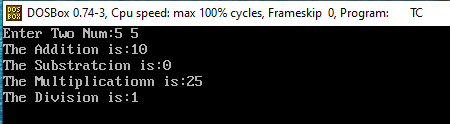
#include<stdio.h>
#include<conio.h>
void main()
{
int a,b,c;
clrscr();
printf("Enter Two Num:");
scanf("%d %d",&a,&b);
c=a+b;
printf("The Addition is:%d\n",c);
c=a-b;
printf("The Substratcion is:%d\n",c);
c=a*b;
printf("The Multiplicationn is:%d\n",c);
c=a/b;
printf("The Division is:%d\n",c);
getch();
}
<html>
<body>
<title>find number of vowels in a string in JavaScript</title>
<script type="text/javascript">
function GetVowels() {
var str = document.getElementById('txtname').value;
var count = 0, total_vowels="";
for (var i = 0; i < str.length; i++) {
if (str.charAt(i).match(/[a-zA-Z]/) != null) {
// findVowels
if (str.charAt(i).match(/[aeiouAEIOU]/))
{
total_vowels = total_vowels + str.charAt(i);
count++;
}
}
}
document.getElementById('vowels').value = total_vowels;
document.getElementById('vcount').value = count;
}
</script>
</head>
<body>
<div >
<table border="1px" cellspacing="0" width="30%" style="background-color: #FF6600; color:White">
<tr><td colspan="2" align="center"><b>Get Vowels from String</b></td></tr>
<tr>
<td>Enter Text :</td>
<td><input type='text' id='txtname' /></td>
</tr>
<tr>
<td>Vowels Count :</td>
<td><input type='text' readonly="readonly" id='vcount'/></td>
</tr>
<tr>
<td>Total Vowels :</td>
<td><input type='text' readonly="readonly" id='vowels' /></td>
</tr>
<tr>
<td></td>
<td><input type='button' value='Get Vowels Count' onclick="javascript:GetVowels();" /></td>
</tr>
</table>
</div>
</body>
</html>

A login form is one of the most vital features in web development. It makes it possible to identify users and, based on that identification, either admit entry to a private area or block it.
<-- HyperText Markup Language-->
<html>
<--to store metadata about a web page-->
<head>
<--to define the title of a document.-->
<title>Login Page</title>
</head>
<--to define the main content of a web page-->
<body>
Enter User Name: <input type="text"><br><br>
Enter Password: <input type="Password"><br>
<button>Submit</button> <button>Cancle</button>
</body>
</html>
Printing Workbooks select the cells you want to print and then set that area as the print area Steps to set a print area: Select the cells...


