Sunday, 29 December 2024

Write a program Validation using Javascript

 <html>

<head>

<script>

function myFunction() {

  // Get the value of the input field with id="numb"

  let x = document.getElementById("numb").value;

  // If x is Not a Number or less than one or greater than 10

  let text;

  if (isNaN(x) || x < 1 || x > 10) {

    text = "Input not valid";

  } else {

    text = "Input OK";

  }

  document.getElementById("demo").innerHTML = text;

}

</script>

</head>

<body>

<h2>JavaScript Validation</h2>

<p>Please input a number between 1 and 10:</p>

<input id="numb">

<button type="button" onclick="myFunction()">Submit</button>

<p id="demo"></p>

</body>

</html> 


Thursday, 26 December 2024

Write a program Count Vowels using Javascript

<html>

<head>

<title>find number of vowels in a string in JavaScript</title>

<script type="text/javascript">

function GetVowels() {

var str = document.getElementById('txtname').value;

var count = 0, total_vowels="";

for (var i = 0; i < str.length; i++) {

if (str.charAt(i).match(/[a-zA-Z]/) != null) {

// findVowels

if (str.charAt(i).match(/[aeiouAEIOU]/))

{

total_vowels = total_vowels + str.charAt(i);

count++;

}

}

}

document.getElementById('vowels').value = total_vowels;

document.getElementById('vcount').value = count;

}

</script>

</head>

<body>

<div >

<table border="1px" cellspacing="0" width="30%" style="background-color: #FF6600; color:White">

<tr><td colspan="2" align="center"><b>Get Vowels from String</b></td></tr>

<tr>

<td>Enter Text :</td>

<td><input type='text' id='txtname' /></td>

</tr>

<tr>

<td>Vowels Count :</td>

<td><input type='text' readonly="readonly" id='vcount'/></td>

</tr>

<tr>

<td>Total Vowels :</td>

<td><input type='text' readonly="readonly" id='vowels' /></td>

</tr>

<tr>

<td></td>

<td><input type='button' value='Get Vowels Count' onclick="javascript:GetVowels();" /></td>

</tr>

</table>

</div>

</body>

</html>


Wednesday, 18 December 2024

Write Program To Subtract Two number using javascript

 <!doctype html>

<html>

<head>

<script>

function Sub()

{

  var numOne, numTwo, sum;

  numOne = parseInt(document.getElementById("first").value);

  numTwo = parseInt(document.getElementById("second").value);

  sum = numOne - numTwo;

  document.getElementById("answer").value = sum;

}

</script>

</head>

<body>

<p>Enter the First Number: <input id="first"></p>

<p>Enter the Second Number: <input id="second"></p>

<button onclick="Sub()">Sub</button>

<p>Sum = <input id="answer"></p>

</body>

</html>


Write Program To Add Two number using javascript


<!doctype html>

<html>

<head>

<script>

function add()

{

  var numOne, numTwo, sum;

  numOne = parseInt(document.getElementById("first").value);

  numTwo = parseInt(document.getElementById("second").value);

  sum = numOne + numTwo;

  document.getElementById("answer").value = sum;

}

</script>

</head>

<body>


<p>Enter the First Number: <input id="first"></p>

<p>Enter the Second Number: <input id="second"></p>

<button onclick="add()">Add</button>

<p>Sum = <input id="answer"></p>


</body>

</html>

Monday, 16 December 2024

Write a program to login page using Form Tag in html

Write a program to login page using Form Tag in html

<html>

<head>

<meta charset="utf-8">

<meta name="viewport" content="width=device-width, initial-scale=1">

<title>Form Tag</title>

</head>

<body>

<table border="1">

<form>

<tr>

<td>Enter Your Name:<input type="text" name="t1" required></td>

</tr>

<tr>

<td>Enter Password:<input type="Password" name="p1" required></td>

</tr>

<tr>

<td><button>Submit</button> &nbsp;<button>Cancle</button></td>

</tr>

</form>

</table>

</body>

</html>


Write a program to Confirm Dilog Box


<html>

<body>

<h2>JavaScript Confirm Box</h2>


<button onclick="myFunction()">Click Me</button>

<p id="demo"></p>

<script>

function myFunction() {

  var txt;

  if (confirm("Press a button!")) {

    txt = "You pressed OK!";

  } else {

    txt = "You pressed Cancel!";

  }

  document.getElementById("demo").innerHTML = txt;

}

</script>


</body>

</html>


Write a program to Prompt Dilog Box using html JavaScript

 <html>

<body>


<h2>JavaScript Prompt</h2>


<button onclick="myFunction()">Click Me</button>


<p id="demo"></p>


<script>

function myFunction() {

  let text;

  let person = prompt("Please enter your name:", "Savera");

  if (person == null || person == "") {

    text = "User cancelled the prompt.";

  } else {

    text = "Hello " + person + "! How are you today?";

  }

  document.getElementById("demo").innerHTML = text;

}

</script>


</body>

</html>


Write a program to Confirm Dilog Box using html

 <html>

<body>

<h2>JavaScript Confirm Box</h2>

<button onclick="myFunction()">Click Me</button>

<p id="demo"></p>

<script>

function myFunction() {

  var txt;

  if (confirm("Press a button!")) {

    txt = "You pressed OK!";

  } else {

    txt = "You pressed Cancel!";

  }

  document.getElementById("demo").innerHTML = txt;

}

</script>

</body>

</html>


Write a program To Alert Box using html

 <html>

<body>

<h2>JavaScript Alert</h2>

<button onclick="myFunction()">CLick Me</button>

<script>

function myFunction() {

 alert("I am an alert box!");

}

</script>

</body>

</html>

Write a program to alert Dilox box in Javascript

 <HTML>

<HEAD>

<TITLE>ALERT BOX EXAMPLE</TITLE>

</HEAD>

<BODY>

<SCRIPT Language="JavaScript">

alert("Welcome to Our Website!!!");

document.write('<IMG SRC=""/>');

</SCRIPT>

</BODY>

</HTML>


Write a program to Prompt Dilog Box in Javascript

 <HTML>

<HEAD>

<TITLE>PROMPT BOX EXAMPLE</TITLE>

</HEAD>

<BODY>

<SCRIPT Language="JavaScript">

document.write("<h1>Greetings</h1>");

document.write(prompt("Enter Your Name: ", "Name"));

document.write(" Welcome to Our Site!</h1>");

</SCRIPT>

</BODY>

</HTML>


Thursday, 7 November 2024

Write a program to Area of Rectangle in C

 #include <stdio.h>


int main() {

    int a,b,area;

    printf("Enter side lenth a");

    scanf("%d",&a);

printf("Enter side lenth b");

    scanf("%d",&b);

    area = a*b;

    printf("area of rect is:%d",area);

    return 0;

}

*******************************Output*****************************************

Enter side lenth a5

Enter side lenth b10

area of rect is:50


=== Code Execution Successful ===

Friday, 20 September 2024

Write a program to check String is Equal or not using Javascript

 <!DOCTYPE html>

<html>

<head>

<title>equal</title>

<script type="text/javascript">

var i;

i=0;

for (var i = 1; i < 4; i++)

{

var s1="Savera";

var s2=prompt("enter the string")

if (s1==s2)

{

alert("string is equal")

}

else

{

alert("string is not equal")

}

}

</script>

</head>

<body>

</body>

</html>

Write a program to Check Number Even or Odd using Javascript

 <!DOCTYPE html>

<html>

<head>

<title>Even or odd</title>

</head>

<body>

<script type="text/javascript">

var n=prompt("Enter the number even or odd");

n=parseInt(n);

if (isNaN(n))

{

alert("Enter the number");

}

else if(n==0)

{

alert("The number is zero");

}

else if (n%2) 

{

alert("The number is odd");

}

else

{

alert("The number is enen");

}

</script>

</body>

</html>

Write a program to Factorial Number Using Javascript

 <!DOCTYPE html>

<html>

<head>

<title>factorial</title>

<script type="text/javascript">

var a=prompt("Enter value");

var b=a;

var c=a;

for (var i = 2; i < a; i++)

{

c=c-1;

b=b*c

}

alert(b)

</script>

</head>

</html>

Wite a program to Fiboncy Number Using Javascript

 <!DOCTYPE html>

<html>

<head>

<title>fiboncci</title>

</head>

<body>

<script type="text/javascript">

var a=0,b=1,c,count;

n=window.prompt("Enter the value generate fibonci");

var num=parseInt(n);

document.writeln("<h1>Fiboncci sries for"+num+"terms</h1>");

count=1;

document.writeln(+a+"<br>"+b);

while(count<=num-2)

{

c=a+b;

document.write("<br>"+c+"<br>");

a=b;

b=c;

     ++count;

}

</script>

</body>

</html>

************************************Output************************************

Fiboncci sries for5terms

0
1
1

2

3

Thursday, 19 September 2024

Write a Program to NOFRAME using html

 <!DOCTYPE html>

<html>

<head>

<title>noframe</title>

</head>

<body style="background-color: gray;">

<p>This window does not supperted your PC</p>

</body>

</html>

Write a program to Armstrong Number using JavaScript

 <!DOCTYPE html>

<html>
<head>
	<title>Armstrong number</title>
</head>
<body>
<script type="text/javascript">
	var b,z,c=0;
	var a=prompt("Enter a number");
    z=a;
    while(z>0)
   {
   	b=z%10;
   	c=c+(b*b*b);
   	z=parseInt(z/10);
   }
   if (a==c)
    alert("number is a Armstrong");
else
	alert("number is not Armstrong");
</script>
</body>
</html>

Tuesday, 10 September 2024

Write a program to Adition Two number using javascript

<!doctype html>

<html>

<head>

<title>Add Two Numbers</title>

<script>

  var numOne = 10;

  var numTwo = 20;

  var sum = numOne + numTwo;

  document.write("Sum = " + sum);

</script>

</head>

<body>

</body>

</html>

Write Program to Clickable Dropdown menu using html

 <!DOCTYPE html>

<html>

<head>

<meta name="viewport" content="width=device-width, initial-scale=1">

<style>

.dropbtn {

  background-color: #3498DB;

  color: white;

  padding: 16px;

  font-size: 16px;

  border: none;

  cursor: pointer;

}

.dropbtn:hover, .dropbtn:focus {

  background-color: #2980B9;

}


.dropdown {

  position: relative;

  display: inline-block;

}


.dropdown-content {

  display: none;

  position: absolute;

  background-color: #f1f1f1;

  min-width: 160px;

  overflow: auto;

  box-shadow: 0px 8px 16px 0px rgba(0,0,0,0.2);

  z-index: 1;

}


.dropdown-content a {

  color: black;

  padding: 12px 16px;

  text-decoration: none;

  display: block;

}


.dropdown a:hover {background-color: #ddd;}


.show {display: block;}

</style>

</head>

<body style="background-color:white;">


<h2>Clickable Dropdown</h2>

<p>Click on the button to open the dropdown menu.</p>


<div class="dropdown">

  <button onclick="myFunction()" class="dropbtn">Dropdown</button>

  <div id="myDropdown" class="dropdown-content">

    <a href="#home">Home</a>

    <a href="#about">About</a>

    <a href="#contact">Contact</a>

  </div>

</div>


<script>

/* When the user clicks on the button, 

toggle between hiding and showing the dropdown content */

function myFunction() {

  document.getElementById("myDropdown").classList.toggle("show");

}


// Close the dropdown if the user clicks outside of it

window.onclick = function(event) {

  if (!event.target.matches('.dropbtn')) {

    var dropdowns = document.getElementsByClassName("dropdown-content");

    var i;

    for (i = 0; i < dropdowns.length; i++) {

      var openDropdown = dropdowns[i];

      if (openDropdown.classList.contains('show')) {

        openDropdown.classList.remove('show');

      }

    }

  }

}

</script>


</body>

</html>

Write a program to Select Option using html

 <!DOCTYPE html>

<html>

<head>

<title>Select Option Program</title>

</head>

<body>

<h1>Select Option Program</h1>

Select Your Language:

<select>

<option>English</option>

<option>Hindi</option>

<option>Marathi</option>

</select><br>

<button>Click Me<button>

</body>

</html>

Write a program Image using html

HTML Images Syntax

The HTML <img> tag is used to embed an image in a web page.

Images are not technically inserted into a web page; images are linked to web pages. The <img> tag creates a holding space for the referenced image.

The <img> tag is empty, it contains attributes only, and does not have a closing tag.

The <img> tag has two required attributes:

  • src - Specifies the path to the image
  • alt - Specifies an alternate text for the image
Syntax:

<img src="image_name\image_name.image_exetension">

 <!DOCTYPE html>

<html>

<head>

<style>

img {

  width: 100%;

}

</style>

</head>

<body>

<img src="html5.gif" alt="HTML5 Icon" width="128" height="128">

<img src="html5.gif" alt="HTML5 Icon" style="width:128px;height:128px;">

</body>

</html>

The alt Attribute

The required alt attribute provides an alternate text for an image, if the user for some reason cannot view it (because of slow connection, an error in the src attribute, or if the user uses a screen reader).

The value of the alt attribute should describe the image:

<img src="image_name\image_name.image_exetension" alt="image_name">

Image Size - Width and Height

You can use the style attribute to specify the width and height of an image.

<img src="image_name\image_name.image_exetension" height="300" width="200">

Width and Height, or Style?

The widthheight, and style attributes are all valid in HTML.

However, we suggest using the style attribute. It prevents styles sheets from changing the size of images:

<!DOCTYPE html>

<html>

<head>

<style>

/* This style sets the width of all images to 100%: */

img {

  width: 100%;

}

</style>

</head>

<body>

<h2>Width/Height Attributes or Style?</h2>

<p>The first image uses the width attribute (set to 128 pixels), but the style in the head section overrides it, and sets the width to 100%.</p>

<img src="html5.gif" alt="HTML5 Icon" width="128" height="128">

<p>The second image uses the style attribute to set the width to 128 pixels, this will not be overridden by the style in the head section:</p>

<img src="html5.gif" alt="HTML5 Icon" style="width:128px;height:128px;">

</body>

</html>

Common Image Formats:

Abbreviation

File Format

File Extension

APNG

Animated Portable Network Graphics

.apng

GIF

Graphics Interchange Format

.gif

ICO

Microsoft Icon

.ico, .cur

JPEG

Joint Photographic Expert Group image

.jpg, .jpeg, .jfif, .pjpeg, .pjp

PNG

Portable Network Graphics

.png

SVG

Scalable Vector Graphics

.svg


Chapter Summary

  • Use the HTML <img> element to define an image
  • Use the HTML src attribute to define the URL of the image
  • Use the HTML alt attribute to define an alternate text for an image, if it cannot be displayed
  • Use the HTML width and height attributes or the CSS width and height properties to define the size of the image
  • Use the CSS float property to let the image float to the left or to the right

Write a program to Select File using html

 <!DOCTYPE html>

<html>

<body>

<h1>Select File</h1>

Select Your File: <input type="file">

</body>

</html>


Write a program to Video Tag using html

 <!DOCTYPE html>

<html>

<body>


<h1>The video element</h1>


<video width="320" height="240" controls>

  <source src="movie.mp4" type="video/mp4">

  <source src="movie.ogg" type="video/ogg">

  Your browser does not support the video tag.

</video>


</body>

</html>


Write a program to Frame


<html>
<head>
   <title>HTML Frames</title>
</head>
<frameset cols="25%,50%,25%">
   <frame name="left" src="/html/top_frame.htm" />
   <frame name="center" src="/html/main_frame.htm" />
   <frame name="right" src="/html/bottom_frame.htm" />
   <noframes>
      <body>
         Your browser does not support frames.
      </body>
   </noframes>
</frameset>
</html>

Friday, 6 September 2024

Write a program to Multiplication in C

 *******Write a program to Multiplication in C *******

#include<stdio.h>

#include<conio.h>

void main()

{

clrscr();  //Previous screen clear

int a,b,c;

printf("Enter Two Num:");

scanf("%d %d",&a,&b);

c=a*b;

printf("The Multiplication is %d\n",c);

getch();

*********************************Output *************************************

Enter Two Num: 5 5

The Multiplication is  25


Write a program to Division in C

 *******Write a program to Division in C *******

#include<stdio.h>

#include<conio.h>

void main()

{

clrscr();  //Previous screen clear

int a,b,c;

printf("Enter Two Num:");

scanf("%d %d",&a,&b);

c=a/b;

printf("The Division is %d\n",c);

getch();

}

===================================Output=================================

Enter Two Num: 10 5

The Division is :2

Write a program to Subtraction in C

 *******Write a program to Subtraction in C *******

#include<stdio.h>

#include<conio.h>

void main()

{

clrscr();  //Previous screen clear

int a,b,c;

printf("Enter Two Num:");

scanf("%d %d",&a,&b);

c=a-b;

printf("The Sub is %d\n",c);

getch();

}

*************************************Output****************************************

Enter Two Num : 10 5

The Sub is : 5


Write a program Addition Two Number in C

#include<stdio.h>

#include<conio.h>

void main()

{

clrscr();  //Previous screen clear

int a,b,c;

printf("Enter Two Num:");

scanf("%d %d",&a,&b);

c=a+b;

printf("The Sum is %d\n",c);

getch();

}


Output:

******************************************

Enter Two Num:2   2

The Sum is 4


Thursday, 29 August 2024

Write a Program to Background Color In Html

 <!DOCTYPE html>

<html>

<body style="background-color:#DFFF00;">


<h1>This is a heading</h1>

<p>This is a paragraph.</p>

</body>

</html>


Write a Program to Inline CSS in Html

 <!DOCTYPE html>

<html>

<body>


<p>I am normal</p>

<p style="color:Green;">I am Green</p>

<p style="color:#cb4335;">I am flush mahogany red</p>

<p style="font-size:60px;">I am big</p>


</body>

</html>


Write a program to Ordered List And Unordered List

 <!DOCTYPE html>

<html>

<body>


<h2>An Unordered HTML List</h2>


<ul>

  <li>Coffee</li>

  <li>Tea</li>

  <li>Milk</li>

</ul>  


<h2>An Ordered HTML List</h2>


<ol>

  <li>Coffee</li>

  <li>Tea</li>

  <li>Milk</li>

</ol> 


</body>

</html>


Write a Program to UnOrdered List in Html

 <!DOCTYPE html>

<html>

<body>

<h2>An UnOrdered HTML List</h2>

<ul>

  <li>Coffee</li>

  <li>Tea</li>

  <li>Milk</li>

</ul>  

 </body>

</html>


Write a Program to Ordered List ih

 <!DOCTYPE html>

<html>

<body>

<h2>An Ordered HTML List</h2>

<ol>

  <li>Coffee</li>

  <li>Tea</li>

  <li>Milk</li>

</ol> 

</body>

</html>


Write a program to button ih html

 <!DOCTYPE html>

<html>

<body>

<h2>HTML Buttons</h2>

<p>HTML buttons are defined with the button tag:</p>

<button>Click me</button>

</body>

</html>


Write a program to links in html

 HTML Links - Hyperlinks

HTML links are hyperlinks.

You can click on a link and jump to another document.

When you move the mouse over a link, the mouse arrow will turn into a little hand.

Note: A link does not have to be text. A link can be an image or any other HTML element!

HTML Links - Syntax

The HTML <a> tag defines a hyperlink. It has the following syntax:


<a href="url">link text</a>


<!DOCTYPE html>

<html>

<body>

<h2>HTML Links</h2>

<p>HTML links are defined with the a tag:</p>

<a href="https://saveracom.blogspot.com/">This is a link</a>

</body>

</html>


By default, links will appear as follows in all browsers:

  • An unvisited link is underlined and blue
  • A visited link is underlined and purple
  • An active link is underlined and red
  • HTML Links - The target Attribute

    By default, the linked page will be displayed in the current browser window. To change this, you must specify another target for the link.

    The target attribute specifies where to open the linked document.

    The target attribute can have one of the following values:

    • _self - Default. Opens the document in the same window/tab as it was clicked
    • _blank - Opens the document in a new window or tab
    • _parent - Opens the document in the parent frame
    • _top - Opens the document in the full body of the window
Example:

<!DOCTYPE html>
<html>
<body>

<h2>The target Attribute</h2>

<a href="image_name" target="_blank">Visit W3Schools!</a> 

<p>If target="_blank", the link will open in a new browser window or tab.</p>

</body>
</html>

Absolute URLs vs. Relative URLs

Both examples above are using an absolute URL (a full web address) in the href attribute.

A local link (a link to a page within the same website) is specified with a relative URL (without the "https://www" part)

Example 

<!DOCTYPE html>

<html>

<body>

<h2>Absolute URLs</h2>

<p><a href="https://web.whatsapp.com/" target="_blank">Whats App</a></p>

<p><a href="https://www.google.com/" target="_blank">Google</a></p>

<h2>Relative URLs</h2>

<p><a href="html_images.asp">HTML Images</a></p>

<p><a href="https://saveracom.blogspot.com/">Bloger</a></p>

</body>

</html>

HTML Links - Use an Image as a Link

To use an image as a link, just put the <img> tag inside the <a> tag:

<!DOCTYPE html>

<html>

<body>

<h2>Image as a Link</h2>

<p>The image below is a link. Try to click on it.</p>

<a href="https://saveracom.blogspot.com"><img src="smiley.gif" alt="HTML tutorial" style="width:42px;height:42px;"></a>

</body>

</html>

Link to an Email Address

Use mailto: inside the href attribute to create a link that opens the user's email program (to let them send a new email):

<!DOCTYPE html>

<html>

<body>

<h2>Link to an Email Address</h2>

<p>To create a link that opens in the user's email program (to let them send a new email), use mailto: inside the href attribute:</p>

<p><a href="saveracom10@gmail.com">Send email</a></p>

</body>

</html>

Button as a Link

To use an HTML button as a link, you have to add some JavaScript code.

<!DOCTYPE html>

<html>

<body>

<h2>Button as a Links</h2>

<p>Click the button to go to the HTML tutorial.</p>

<button onclick="document.location='https://saveracom.blogspot.com/'">HTML Tutorial</button>

</body>

</html>

Write a Program To Heading Tag In H1 to H6

 <!DOCTYPE html>

<html>

<head>

<title>Heading Pagee</title>

</head>

<body bgcolor="pink" align = "center">  

<b>Heading tags, also known as header tags,<br> in HTML are used to differentiate headings and subheadings from the rest of the content on a page. <br>There are six heading levels, from H1 to H6, <br>with H1 being the most important and H6 being the least important.</b>

<h1>This is Heading 1</h1>

<h2>This is Heading 2</h2>

<h3>This is Heading 3</h3>

<h4>This is Heading 4</h4>

<h5>This is Heading 5</h5>

<h6>This is Heading 6</h6>

</body>

</html>


Saturday, 24 August 2024

Write a Program to Registration Page in HTML

<!DOCTYPE html>

<html>

<head>

<title>Registration Example</title>

</head>

<body bgcolor="gray" align = "center">  

<table border=1 width="500px;" Height="300px;" bgcolor="Lightskyblue" align="center">

<tr> <td> Enter Name:<input type="text" name="n1"></td></tr>

<tr> <td> Enter Address:<textarea cols="25" rows="3" placeholder="Current Address" value="address" required>  

</textarea>  </td></tr>

<tr> <td> Select Gender:<input type="radio" name="r1">Male<input type="radio" name="r1">Female  <input type="radio" name="r1">Othe</td></tr>

<tr><td>Enter E-Mail Address<input type="text" name ="n2"></td></tr>

<tr><td>Enter Password<input type="password" name ="n2"></td></tr>

<tr><td><input type="Submit" name ="Submit"></td></tr>

</body>

</html>


Friday, 23 August 2024

Write a Program to a Paragraph in html

<!DOCTYPE html>


<html>


<head>


<title>Paragraph Example</title>


</head>


<body>

<p>I am a paragraph.</p>


</body>

</html>


Write a Program Leaf Year or Not in Javascript

 <!DOCTYPE html>

<html>

<head>

<title>leap year</title>

<script type="text/javascript">

     var b,c;

     var a=prompt("Enter year");

     b=a%4;

     c=a%400;

     if(b==0||c==0)

     {

        alert("Given number is leaf");

     }   

     else

     {

        alert("Given number is Not leaf")

     }

    </script>

</head>

<body>

</body>

</html>


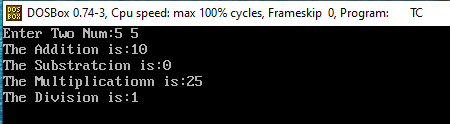
Write a program Arithmatic of Two Number in C

#include<stdio.h>

#include<conio.h>

void main()

{

int a,b,c;

clrscr();

printf("Enter Two Num:");

scanf("%d %d",&a,&b);

c=a+b;

printf("The Addition is:%d\n",c);

c=a-b;

printf("The Substratcion is:%d\n",c);

c=a*b;

printf("The Multiplicationn is:%d\n",c);

c=a/b;

printf("The Division is:%d\n",c);

getch();

}


Wednesday, 21 August 2024

Write a program Count Vowels in Javascript


 <html>

<body>

<title>find number of vowels in a string in JavaScript</title>

<script type="text/javascript">

function GetVowels() {

var str = document.getElementById('txtname').value;

var count = 0, total_vowels="";

for (var i = 0; i < str.length; i++) {

if (str.charAt(i).match(/[a-zA-Z]/) != null) {

// findVowels

if (str.charAt(i).match(/[aeiouAEIOU]/))

{

total_vowels = total_vowels + str.charAt(i);

count++;

}

}

}

document.getElementById('vowels').value = total_vowels;

document.getElementById('vcount').value = count;

}

</script>

</head>

<body>

<div >

<table border="1px" cellspacing="0" width="30%" style="background-color: #FF6600; color:White">

<tr><td colspan="2" align="center"><b>Get Vowels from String</b></td></tr>

<tr>

<td>Enter Text :</td>

<td><input type='text' id='txtname' /></td>

</tr>

<tr>

<td>Vowels Count :</td>

<td><input type='text' readonly="readonly" id='vcount'/></td>

</tr>

<tr>

<td>Total Vowels :</td>

<td><input type='text' readonly="readonly" id='vowels' /></td>

</tr>

<tr>

<td></td>

<td><input type='button' value='Get Vowels Count' onclick="javascript:GetVowels();" /></td>

</tr>

</table>

</div>

</body>

</html>


Sunday, 18 August 2024

Create Login Page in HTML

HTML Login Form

A login form is one of the most vital features in web development. It makes it possible to identify users and, based on that identification, either admit entry to a private area or block it.

  • To standard field Architecture, such a form usually combines a field for input of a username or e-mail address with another field for a password. It features a button to log in. More often than not, the form would allow new users to signup or register.
  • When the user clicks the submit button the form sends back what was entered to the server. The server then verifies that the credentials are correct. In case of matching login details with the stored data, access will be permitted to secure content on the site. If the details are wrong an error message will be shown. The user can then try again.
  • This is an important HTML login form that would work in securing Web applications. It provides access


<-- HyperText Markup Language-->

 <html>

<--to store metadata about a web page-->

<head>

<--to define the title of a document.-->

<title>Login Page</title>

</head>

<--to define the main content of a web page-->

<body>

Enter User Name: <input type="text"><br><br>

Enter Password: <input type="Password"><br>

<button>Submit</button> <button>Cancle</button>

</body>

</html>


Data Science using Spreadsheet Software Assignment 3

Printing Workbooks select the cells you want to print and then set that area as the print area   Steps to set a print area: Select the cells...